Understand Bluetooth delay when playing a Mac software instrument
A note that sounds after you press the key can make playing a software instrument feel awkward, even when ordinary music playback sounds fine. Start by identifying what is late: the sound you hear while playing, the recorded region afterward, or the song's actual playback speed.
SoundBuddy is our product. It can show device connection status and help you inspect or choose the Mac's default microphone. Those are useful setup checks, but they are not measurements of headphone delay or calibration of a music app's recording timing.
Describe what is late before changing the project
Try a short, familiar phrase at a comfortable listening level. Note which of these you observe:
- The instrument responds late in your headphones as you play.
- The newly recorded part sits off the beat when you play it back.
- The whole song appears to play at a different speed.
These descriptions lead to different investigations. Do not immediately move every recorded region or change the project tempo to compensate for a monitoring problem.
A public GarageBand discussion shows why the distinction matters. The author clarified that a newly recorded region was shifted, while earlier parts were fine, and later reported that reopening the app helped. That is a reported outcome in one case, not proof that Bluetooth caused it or that restarting fixes every delay.
Compare one existing output route
Apple's Logic Pro guidance says Bluetooth headphones or speakers add monitoring latency and recommends them for mixing or listening rather than live performance in Logic. A connection can therefore work for listening while being an inconvenient choice for playing an instrument in real time.
If you already have a suitable wired headphone or interface output, compare it before purchasing anything:
- Note the music app's selected output and current project settings.
- Keep the instrument, input, effects and phrase unchanged.
- Select the existing wired output in that app and keep the level comfortable.
- Play the same phrase and note whether the response feels different.
This is a subjective comparison, not a millisecond measurement. A wired route avoids the Bluetooth part of the path, but it does not remove every possible delay in the app, interface or project. If no suitable alternative is available, record the current setup and continue with the app's own documentation.
Understand what a buffer change can address
In Logic Pro, Apple describes smaller I/O buffers as a way to reduce software monitoring delay, with greater processing demand and possible overloads. That setting does not eliminate Bluetooth transport delay. Avoid changing buffer size, sample rate and several plug-ins at once just because one test feels late.
Use the controls documented for your installed music app. A Logic Pro menu path is not automatically a GarageBand menu path. Advice that mentions a control you cannot find may concern a different app or version.
Ableton's Bluetooth guidance for Note separately explains delay from audio travelling to and being decoded by headphones. Its instructions concern Note; they are not a Mac Live settings walkthrough. Do not copy a published latency range as a measurement of your own headphones.
Read connection and microphone status for what they show
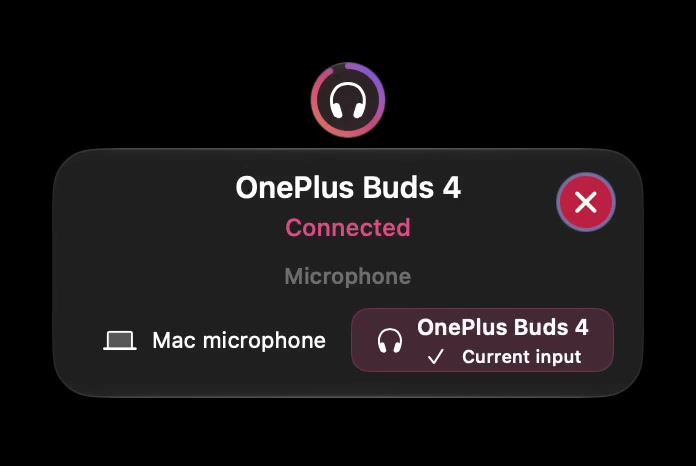
Open the full-size actual device-status capture
Use SoundBuddy to inspect the connection and input information it actually displays. Confirm the music app's output separately. A current-input label does not establish which route you are hearing, and a connected label does not establish that the route suits real-time playing.
If your separate problem is a change in Bluetooth sound quality when its microphone is used, see the Mac microphone with Bluetooth output guide. Keeping that input/output choice clear is different from promising zero-delay Bluetooth monitoring.
Next step: describe the symptom precisely, compare one existing output route if available and record what changed. If a recording still lands incorrectly, investigate that app's recording-timing behavior separately rather than assuming the headphone connection explains it.