Paired, connected and selected on Mac: understand the three states
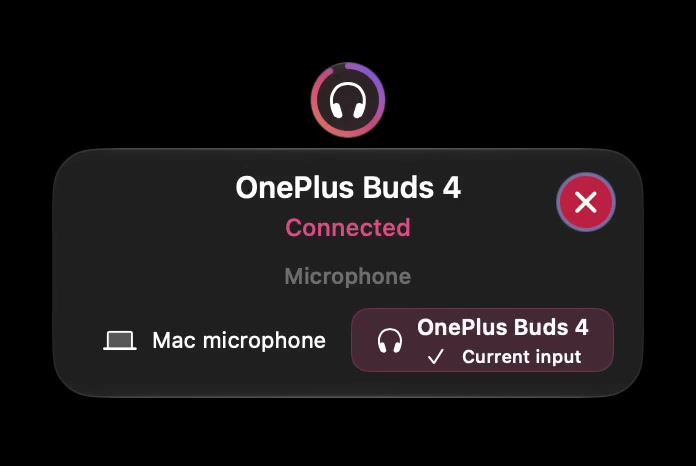
When a headset appears in a device list, first ask what that list establishes. A saved pairing, a current Bluetooth connection and the device selected for sound are different observations. Keeping them separate helps you avoid re-pairing a device when the actual issue is input or output choice.
SoundBuddy is our product. Its status views can help you inspect device state, but a picture or product name is not proof of every supported function.
Read the state before taking an action
| State | What you know | What remains unconfirmed |
|---|---|---|
| Paired or remembered | The Mac retains a relationship with the accessory | A current connection, usable audio or battery data |
| Connected | A current device connection is reported | Whether it is selected for input or output |
| Selected for output | This is the intended listening destination | Which microphone the app uses |
| Selected for input | This is the chosen microphone at that layer | Other apps' explicit choices and battery reporting |
Treat each row as a question to verify, not a progression that every accessory automatically completes. A headset can be useful for listening while another microphone handles your voice.
Choose the next check
If the device is remembered but disconnected, use its normal connection instructions. Apple's Bluetooth guide covers connecting accessories and selecting Bluetooth audio input or output. Follow the maker's instructions when the device needs pairing mode.
If it is connected but you hear nothing, inspect the selected output and your app's volume or mute state. If listening works but your voice uses the wrong microphone, check input selection. The guide to Mac microphone input with Bluetooth headphone output explains that arrangement.
If audio works but a battery percentage is missing, move to the battery-reading guide. Repeating pairing steps is not evidence that a battery reading will become available.
Use SoundBuddy's status carefully
The compact menu, dashboard and settings present different parts of the device story. Read the label beside an action. A disabled control or unavailable input should remain part of your description when asking for help.
Do not use a generic headphones illustration as a model-support list. Artwork represents a product or category; hardware support needs observations for the actual device, feature, macOS version and app build.
Make one reversible change
Record the starting state, change one relevant selection, then check the result. Disconnecting a device during a call can interrupt it, so do connection experiments in a quiet test window. Keep a known listening alternative available if you need one.
Next step: write “paired,” “connected,” “selected output” and “selected input” as separate fields in your next troubleshooting note.