Understand the different checks when opening SoundBuddy

Installing an app, activating a licence and enabling a feature are different stages. If SoundBuddy opens but typing feedback still says permission is required, identify which stage is incomplete before downloading it again or changing unrelated settings.
SoundBuddy is our product. This guide separates installer checks, purchase activation, macOS input permission and the result you actually observe. It complements the installation and keyboard guides rather than replacing their steps.
Identify the stage from the message
- macOS asks about a downloaded app: review the app and download origin before deciding whether to open it.
- SoundBuddy asks you to activate a licence: use the purchase-activation instructions in the installation guide.
- Keyboard sounds show Input Monitoring permission required: review that feature's system permission and setup.
- The feature is enabled but the result is wrong: inspect its status and observed behavior, not just the switches.
A successful check at one stage does not establish the next. A receipt is not proof of working typing feedback, and a sound preview is not proof that typing in another app has been enabled.
Understand what signing and notarisation check
The current SoundBuddy installation guide identifies the direct installer as Developer ID signed and notarised. It also states the supported platform and installation instructions. Follow that current guide rather than an old installer filename in a screenshot.
Apple explains notarisation as an automated scan for malicious content and code-signing issues. It is not the App Store's App Review process. It should not be presented as a guarantee about every future action, privacy decision or feature result.
Apple's safe app-opening guidance explains that macOS can still request approval before first opening an identified developer's app downloaded outside the App Store. A normal downloaded-app confirmation is different from a warning about malicious software, damage or an unverifiable developer.
If the message does not match the expected installation flow, stop and use the installation guide's support route with the exact wording. This guide does not ask you to disable Gatekeeper, remove quarantine or override an unexpected warning.
Keep licence activation separate from system permission
The installation guide describes activating the purchase in SoundBuddy and its online licence checks. That is a purchase-entitlement step. It does not grant a macOS privacy permission on your behalf.
If licence verification succeeds but a feature reports incomplete setup, inspect that feature's own status. Repeating a purchase is not the same action as reviewing Input Monitoring. If the licence itself reports a problem, use the licence instructions instead of changing input permissions to troubleshoot it.
Keep purchase emails and licence keys private. A screenshot of the relevant status is often enough to describe the stage; do not include the full activation field in a public report.
Decide whether you want typing feedback across apps
Apple's Input Monitoring guide explains that this permission can let an app monitor keyboard, mouse or trackpad input while other apps are in use. You control which apps have that access and should review their privacy practices.
For SoundBuddy, playing feedback while typing in other apps is separate from trying sounds in its local test area. The current released keyboard preview path can work without starting its global listener, subject to the app's relevant playback conditions. A permission decision should follow the feature you want, rather than the presence of a notarisation statement.
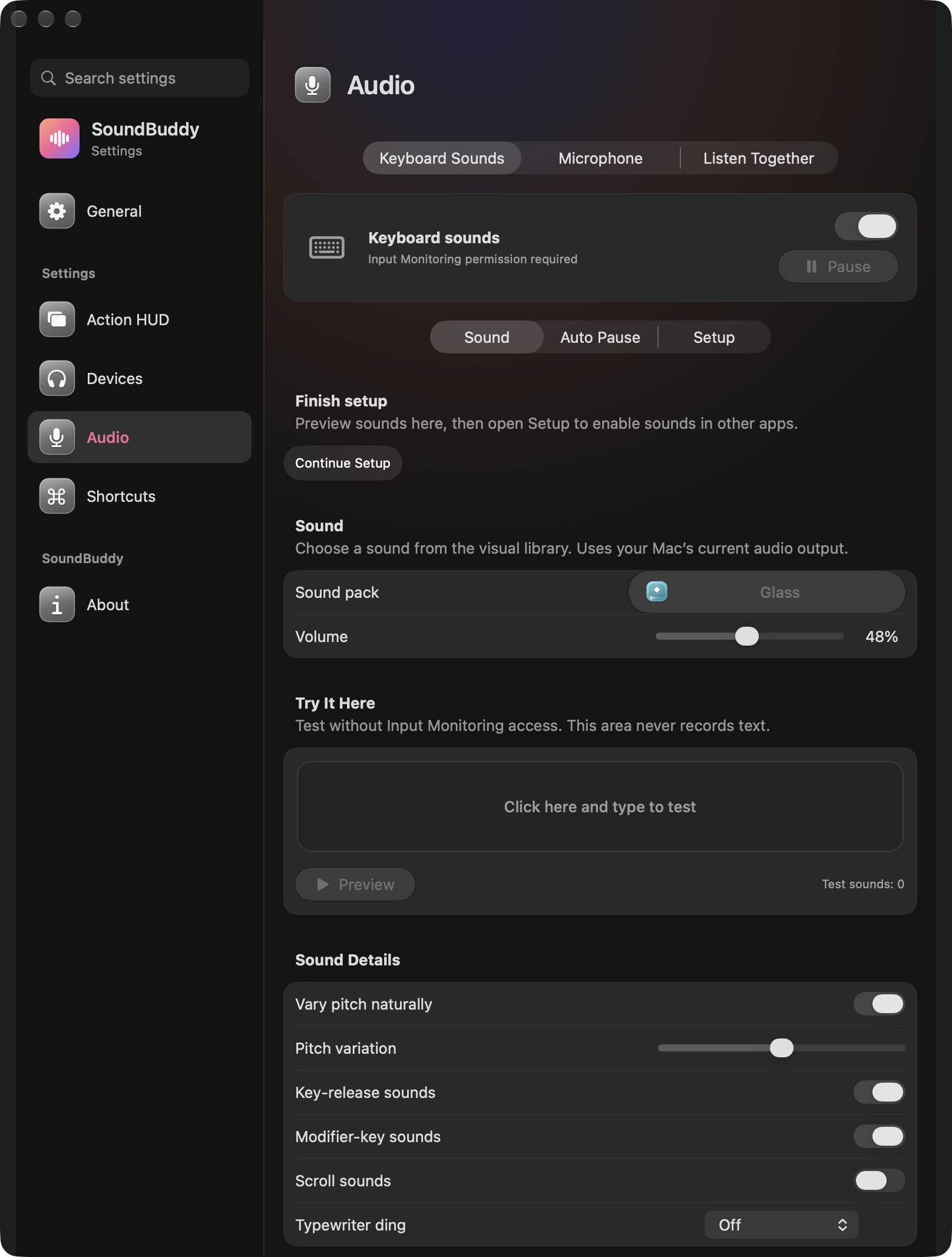
Open the full-size actual keyboard-settings capture
Use the keyboard setup guide if you choose cross-app feedback. If you later want to remove that access, the permission-removal guide covers that separate decision. You can leave a permission off when you do not want the feature that needs it.
Verify the result separately from the approval
After a deliberate setup choice, evaluate the specific interaction you intended. Can you hear the selected feedback in the intended context? Does the status identify a pause condition or incomplete setup? Do not treat an enabled preference as a completed end-to-end test.
A public keyboard-sound discussion includes a user reporting unreliable playback despite permissions appearing granted. It concerns another app and does not establish its cause or SoundBuddy's behavior. It illustrates why permission state and a working result should be recorded separately.
Next step: name the message you see, identify its stage and follow the matching guide. Keep opening the app, verifying the purchase, granting optional access and experiencing the feature as distinct observations.