Use SoundBuddy shortcuts while the app is active

If a SoundBuddy shortcut responds in its window but does nothing after you switch to your editor or browser, check its scope before changing permissions. The shortcuts in SoundBuddy Settings are in-app shortcuts. They work while SoundBuddy is the active app.
SoundBuddy is our product. Its Shortcuts page currently offers Show Dashboard and Show Status Window actions. These are not system-wide microphone-mute commands or global hotkeys for controlling SoundBuddy from every other app.
Check the active app first
Bring a SoundBuddy window forward and confirm SoundBuddy is the active app in the menu bar. Finish or dismiss any shortcut editor or other modal sheet before trying an existing shortcut. Press the saved combination once, rather than holding it down.
A background app can still be running without receiving this kind of shortcut. If the same combination works after you return to SoundBuddy, that is consistent with the documented in-app scope. It does not establish that Input Monitoring is broken.
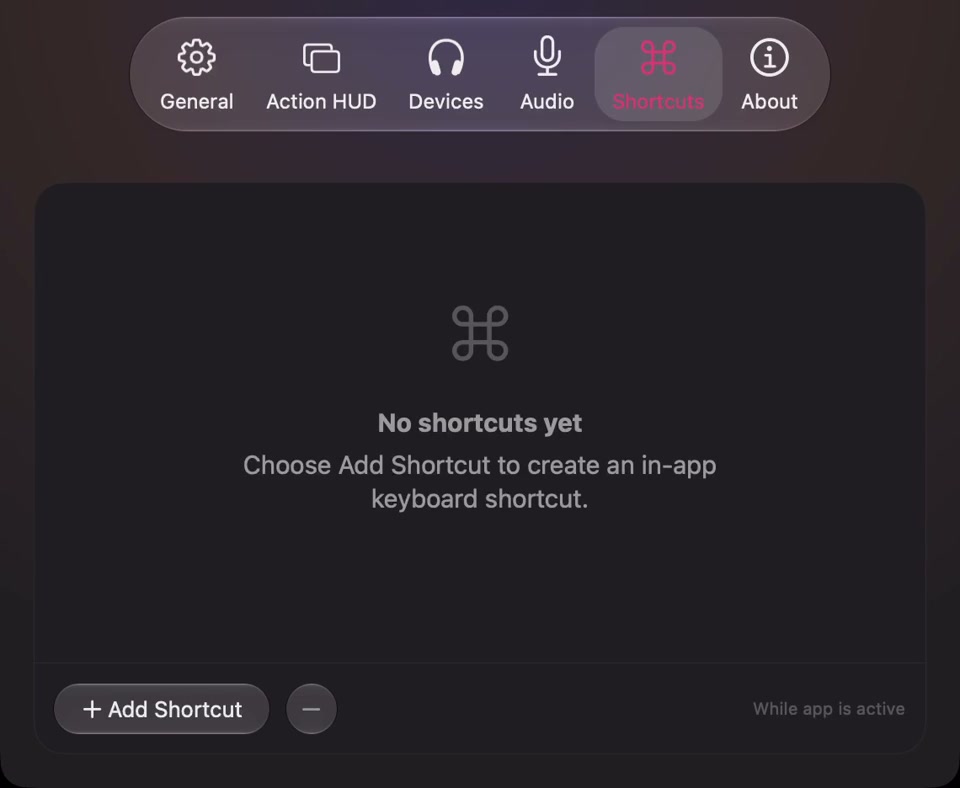
Open the full-size actual Shortcuts capture
Add one useful action
Open SoundBuddy Settings > Shortcuts and choose Add Shortcut. Select one of the actions offered in your installed copy. Begin with the action you actually want to use, rather than assigning several combinations at once.
In the editor, click the shortcut recording control and press one letter or number with Command, Option or Control. Shift can be part of the combination, but Shift alone is not sufficient. Read any validation message before saving.
The app rejects duplicate combinations within its own shortcut list and certain reserved commands. An accepted combination is not a guarantee that no system feature or other utility uses it. Choose an alternative if it interferes with something you already rely on.
Click Save, let the editor close, then try the combination with SoundBuddy active. Cancel leaves the edit unapplied. If you use Clear to remove a binding, save that edit to apply it. To remove a listed shortcut instead, select its row and use the remove control.
Separate a conflict from an inactive app
Test in this order:
- Confirm the shortcut appears in SoundBuddy's list with the intended modifiers.
- Confirm SoundBuddy is active and no editor sheet is open.
- Press the combination once and observe the action.
- If another command runs or nothing happens, inspect existing menu and system assignments before choosing another combination.
Apple's shortcut-conflict guide explains that shortcut behavior can depend on the app and keyboard layout. It recommends checking the app's menus and describes conflict warnings in System Settings > Keyboard > Keyboard Shortcuts. Those warnings do not constitute a complete inventory of every third-party shortcut.
For support, note the action, exact combination, keyboard layout, active app and observed result. That is more useful than reporting only that a key is broken. If the clickable action also fails, investigate that action separately instead of repeatedly changing the shortcut.
Keep local shortcuts separate from other keyboard features
SoundBuddy's keyboard sound feedback has a different setup and permission path. Granting Input Monitoring for keyboard sounds does not turn these in-app action shortcuts into global hotkeys. See the keyboard setup guide for that separate feature.
The Shortcuts page is also separate from Apple's Shortcuts automation app. An old public foreground-only shortcut discussion concerns Things actions through Apple's app, not SoundBuddy. Its troubleshooting steps are not evidence that SoundBuddy supports background triggering.
If you need access while another app is active, use SoundBuddy's visible menu or window controls as appropriate. The menu-bar access guide explains recovery if you chose No Icon. Do not rely on an in-app shortcut as your only way to bring SoundBuddy back.
Next step: save one action, test it once with SoundBuddy active and record the result. Keep the binding only if it suits that workflow. No time-saving result or global shortcut capability is implied.