AirPods chime too loud? Check Tone Volume on Mac
If music is quiet but a headphone chime still feels too prominent, identify the sound's source before lowering the whole Mac again. A headphone's own operational tone, a Mac notification and a SoundBuddy connection cue have different controls.
SoundBuddy is our product. Its connection-sound preference controls its own feedback. This guide uses Apple's documented Tone Volume setting for the separate question of eligible AirPods sound effects.
Identify the event behind the sound
Note whether the sound accompanies a headphone battery warning, putting the headphones on, a connection change or an app notification. Keep that event separate from how loud the current song feels.
An older public AirPods Max discussion describes a low-battery tone feeling loud even when listening volume was low. A later participant could find a phone control but not the equivalent on a Mac. That shows both the volume question and the need for device-specific instructions. It is not a confirmed Mac fix or a reason to copy a commenter's percentage.
Use the Mac alert guide if the sound comes from a system alert or an app notification. The task here is the sound effect played by the headphones themselves.
Inspect Apple's Tone Volume control
Apple's AirPods sound-effects guide describes adjusting effects such as ear-detection sounds, certain control actions and low-battery alerts. For its documented Mac workflow, wear the AirPods and ensure they are connected, then open System Settings > Accessibility > Audio and inspect Tone Volume.
Record the current setting before deciding whether to change it. Use the instructions and options for your model and macOS version. If you cannot find the control, note the exact headphones and connection instead of assuming that a phone screenshot describes the Mac interface.
The guide describes adjustment, not a universal off switch or a particular percentage that is right for every listener. Changing this setting is also a different decision from changing music-player loudness normalization or the Mac's main output level.
Keep availability and the desired result separate
Apple's Audio accessibility reference identifies Tone volume as a control for effects played by headphones, including low-battery alerts. It also notes that available headphone options vary by model.
An available slider establishes that a control is offered in that setup. It does not establish the next alert's perceived loudness or prove how a different model behaves. If your headphones are from another manufacturer, use that model's own instructions rather than assume that Apple's AirPods control applies.
When a documented adjustment is useful, observe a subsequent ordinary cue and decide whether you prefer the result. Do not promise complete silence or infer a sound-level limit from a setting alone.
Keep SoundBuddy's connection cue in its own layer
In SoundBuddy's Action HUD preferences, Play connection and disconnection sounds concerns SoundBuddy's locally played event cues. It is not a remote setting for the headphones' internal low-battery tone.
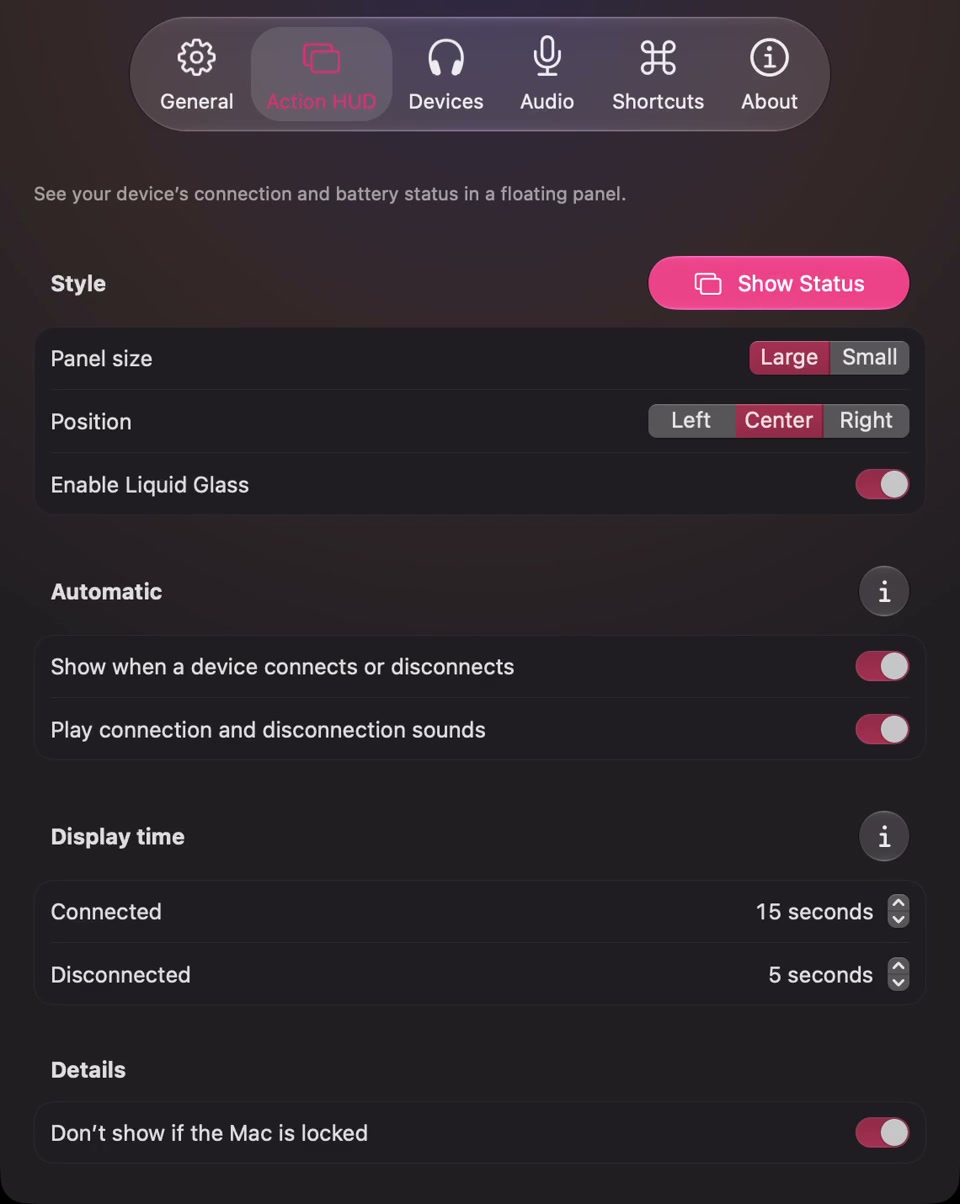
Open the full-size actual Action HUD capture
If a SoundBuddy cue is the sound you intend to change, inspect that preference. Keep the visual connection-panel choice separate if you still want to see its updates. The connection-versus-keyboard sound guide covers those two SoundBuddy features.
If a headphone-origin chime continues with the app's own cue off, preserve that distinction. Do not treat it as proof that a SoundBuddy switch failed to mute every device sound.
Make a small sound-source note
Before changing several controls, record:
- The exact headphone model and the event that accompanies the sound.
- Whether the sound appears to come from the headphones, a Mac/app alert or SoundBuddy's event feedback.
- The relevant control actually available in that setup and its original state.
- Any single deliberate change and what you hear at the next ordinary event.
- Whether other audio you intended to hear remains at your preferred setting.
If the source is still unclear, retain the event description and check one layer at a time. A low-battery sound, a missing battery percentage and an estimated remaining runtime are separate questions. The battery-reading guide covers the latter two without turning a chime into a runtime forecast.
No sound-level measurement, low-battery test or listening comparison was performed for this article. The useful result is finding the control for the sound you intended to change, while preserving the listening setup you want.
Next step: identify which event produces the sound, then inspect the matching headphone, Mac or SoundBuddy control.