Before you sell a Mac utility: test payment, setup and recovery
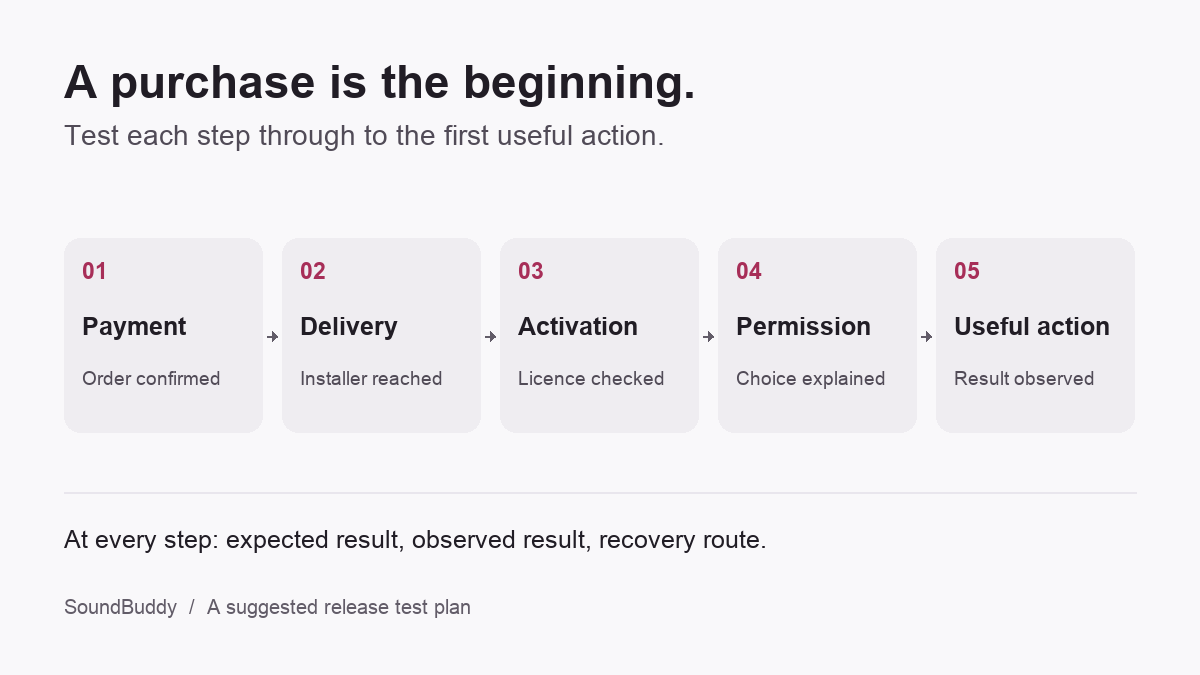
A customer has paid, installed your Mac utility and activated their licence. Can they now do the thing they bought it for?
Test each stage separately: payment, installer delivery, installation, activation and the first useful action. When a stage fails, the customer needs to know what happened and how to recover.
This checklist is for indie developers preparing a direct-sale Mac app. SoundBuddy, our Mac audio utility, provides examples of the boundaries to explain. The checklist is a suggested release test plan, not a claim that every scenario below has been verified in SoundBuddy.
1. Define one result the customer can recognise
Write a sentence that describes the outcome without referring to a setting.
For a microphone utility, that might be: “After I reconnect my headphones, my intended microphone remains selected.” For typing feedback, it could be: “I hear my chosen sound while typing in the app where I work.”
Then record the limits. A call app with its own microphone selection can behave differently from the macOS default. A sound preview inside a settings window does not establish that feedback works while another app is active.
Give the tester an expected result and a visible way to report what happened. “The toggle is enabled” is useful setup information, but it is not the acceptance criterion.
2. Explain the purchase before taking payment
Before checkout, answer the questions that could change someone's decision:
- Which Macs and macOS versions does this release support?
- Is this a one-time purchase or a subscription, and what updates are included?
- How many devices may use a licence?
- When does the app need an internet connection?
- Which features require optional system permissions?
- Where can a customer find installation help, refund terms and support?
Use the same answers on the purchase page, in the app and in support instructions. If an offline policy is still undecided, settle it before promising that the app works offline.
3. Test delivery separately from payment
Use the payment provider's test environment to follow the customer's route from confirmation to the correct installer. Check the confirmation page, delivery email and return visit independently.
Include a delayed or missing delivery message. Can the customer recover access without paying again? If a download link expires, does the page explain how to obtain a fresh one?
Record the release version and build used for the test. Reaching a download page is not evidence that the installer is the intended release, and a local checkout simulation is not proof of live payment settlement.
Keep customer-specific download links and licence keys out of public screenshots and test reports.
4. Treat installation and permission as different decisions
For direct Mac distribution, follow Apple's guidance on notarising macOS software. Notarisation checks for malicious content and signing issues. It does not establish that a feature works on the customer's hardware.
Test the installer on a separate test Mac or a suitable clean test environment. Record what was actually tested rather than treating a successful launch on the development machine as sufficient.
Explain optional permissions at the feature that needs them. Apple's Input Monitoring guidance describes access to input while other apps are in use. A customer should understand why they are being asked and what remains available if they decline.
For a concrete reader-facing example, our guide to SoundBuddy's installer, licence and permission checks separates those stages. Developers should give each stage its own status and recovery instructions.
5. Decide the licence lifecycle before choosing the integration
A key field is only the start. Write down the intended behaviour for first activation, later verification, moving to another Mac, a network failure and a refunded purchase.
For each state, specify three things: what the customer sees, what remains usable and how they recover. A network timeout should be distinguishable from an invalid key, even if both temporarily prevent activation. Keep private provider credentials out of the distributed app.
For further reading, Jobbit's guide to selling a desktop app with licence keys discusses licensing approaches and uses a hosted service as its worked example.
Disclosure: Jobbit and SoundBuddy have discussed reciprocal mentions of these resources. No payment was exchanged. Jobbit suggested this guide during that discussion.
Use the guide to frame questions for your own implementation. Check service-specific claims and policies against the provider's current documentation. They do not describe SoundBuddy's licensing or establish that it offers a trial.
Check that the chosen implementation matches the promises made at checkout. In particular, do not describe a purchase as permanently offline if continuing use depends on online verification.
6. Rehearse failure and recovery
Give a tester this short list. For every row, record the expected message, observed result and next step.
| Scenario | What to verify |
|---|---|
| Confirmation email is delayed | Purchase access can be recovered without a second payment. |
| Activation starts without a connection | The app explains the connection requirement and offers a retry. |
| Licence verification encounters a timeout | The app distinguishes a connectivity problem from a rejected licence. |
| Optional permission is declined | The affected feature explains its limitation and the customer can reconsider later. |
| The customer changes Macs | The documented transfer or support process matches the licence terms. |
| A test refund completes | Purchase status and licence access follow the stated refund policy. |
| Setup appears complete but the feature fails | Support can identify the stage and request useful, non-secret diagnostic details. |
Run refund tests in the payment provider's test environment. A release rehearsal does not require charging or refunding a real customer.
7. Finish with the useful action
Repeat the result from the first section after installation and activation. Test it in the context where the customer needs it, including reconnecting a device or switching to another app where relevant.
For each release, keep a compact record: build, platform, device or app involved, expected result, observed result and unresolved limitation. A failure should produce a support route, not an invitation to repeat the purchase or disable a system protection.
A small Mac utility can have a short onboarding flow. Each step still needs to tell the customer what happened and what to do next.